Skip to content

Wired or wireless: the honest comparison

Wireless cameras are easier to install and harder to live with; wired ones are the reverse. The decision is usually made on installation effort and should be made on what happens during a power cut, a broadband failure and a February of intermittent Wi-Fi.

The comparison is usually framed as convenience against quality. It is really about failure modes.

How wireless fails

Intermittently. Signal at a gable end drops for minutes, the camera reconnects, and the recording has holes in it. Nothing announces this — the app shows a healthy camera — and it is discovered when the footage that mattered is missing.

How wired fails

Rarely, and visibly. A cable is either connected or not. A recorder either has a drive or does not.

The middle ground

A camera with both. The Tapo C520WS in this guide accepts an Ethernet cable as well as Wi-Fi, and using the cable removes the whole class of problem while keeping the camera itself simple.

The thing wired systems do that nothing else does

Keep recording when the internet is down. A wired recorder is on your own cable with your own drive, and a broadband outage or a pulled router changes nothing about what it records.

Which device does your home need?

You want reliability above all
Wired, because it does not depend on batteries or Wi-Fi reaching the far corner of the garden.
You rent or cannot drill
Wireless, which is the reason the format exists.
You want continuous recording
Wired, since battery cameras record events rather than everything.
You want it up this afternoon
Wireless, and accept the maintenance that comes with batteries.

Picking by what you are protecting

Permanent installations

Where wired systems are simply better: no batteries, no signal drops, continuous recording.

Rented or temporary homes

Where wireless is the only realistic option and where removability matters more than anything.

Remote corners of a property

Where Wi-Fi range becomes the deciding factor and where wired cabling solves it outright.

Quick coverage

Where a battery camera goes up in minutes and buys time to plan something permanent.

What actually protects, and what is noise

Power
Wired cameras never run out. Battery cameras need recharging on a schedule you will forget, which is the main ongoing cost of the format.
Connection reliability
Wi-Fi at the end of a garden is often worse than expected. A camera that drops out is a camera you cannot rely on.
Continuous or event recording
Battery cameras record clips around motion. If you need everything, that is a wired requirement.
Installation effort
Running cable is work, and sometimes a job for a professional. That effort buys reliability you do not have to think about again.
Whether you can drill at all
For renters this decides the question before any other criterion applies.

Which figure for which entrance

Your situationThe choiceThe trade-off
Own the homeWiredInstallation effort
RentingWirelessBatteries and Wi-Fi
Far corner of a plotWiredCable run
Need it todayWirelessOngoing maintenance

Where this is usually botched

Underestimating battery maintenance
A camera that needs recharging every few weeks becomes a chore, and a chore not done is a camera not working.
Assuming Wi-Fi reaches
Walls, distance and interference all bite. Testing signal at the intended spot before mounting saves a wasted installation.
Expecting continuous recording from a battery camera
They record events to preserve battery. If you need a complete record, that is a different product.
Mounting where you cannot reach
Every camera needs cleaning and, if battery-powered, recharging. Height that requires a ladder every time is a design mistake.

By the home you have

The homeowner
Is usually better off wired, accepting the installation to gain years of not thinking about it.
The renter
Needs wireless, and should plan around batteries and signal from the start.
The impatient
Starts wireless and often ends up wiring the important positions later.

Batteries, updates and working life

Wired cameras need lens cleaning and little else; wireless cameras add battery cycles and connection checks. In both cases a lens covered in cobwebs or salt causes more missed footage than any technical failure.

  • Clean lenses regularly; spiders are drawn to the warmth and infrared.
  • Recharge battery cameras before they are flat rather than after.
  • Check the recorded footage occasionally; a camera can appear online and record nothing.
  • Inspect outdoor cable entries for water ingress once a year.

Safety

Cameras are network devices as well as security devices.

  • Change default passwords and disable remote access you do not use.
  • Keep firmware current; camera vulnerabilities are actively exploited.
  • Position cameras to see your own property rather than a neighbor's windows.
  • Work safely at height; most camera installation injuries are falls.

The choices, and what settled them

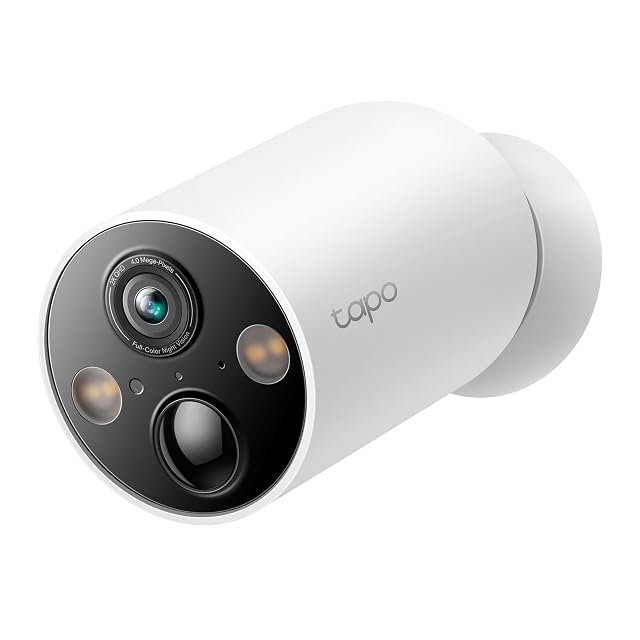
  1. Tapo C425

    2K QHD · 10,000 mAh · magnetic base · 142° FOV · free AI detection · solar ready

    TP-Link's battery camera: 2K on a 142° lens, a 10,000 mAh cell, a magnetic base that grips any iron surface, and person, pet and vehicle detection included rather than sold as a subscription feature.

    Best for: Someone who wants a battery camera that can be repositioned in seconds and detection that costs nothing extra.
    8.4/10

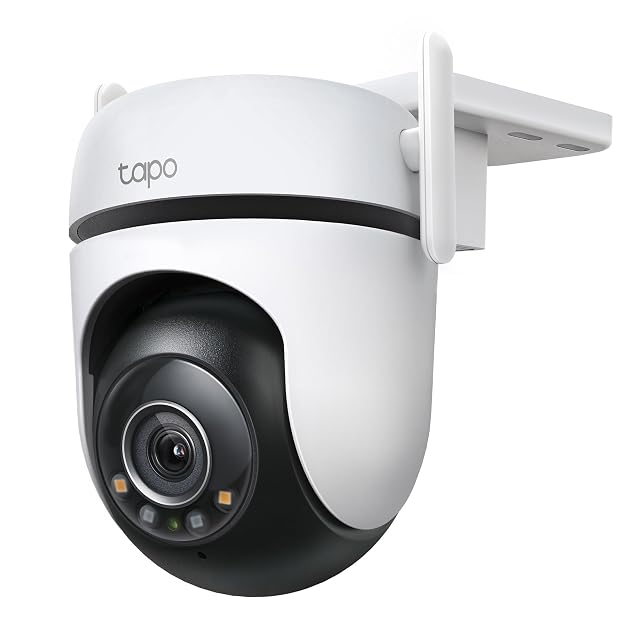
  2. Tapo C520WS

    2K 4MP · F1.6 Starlight · 360° pan · IP66 · Wi-Fi or Ethernet

    A 2560 × 1440 sensor behind an F1.6 lens gives more color in low light before it turns on its spotlights, and it can be wired to Ethernet instead of trusting Wi-Fi.

    Best for: An outdoor position where Wi-Fi is unreliable and a network cable can be run, or where color at night matters more than an unlit image.

    8.1/10

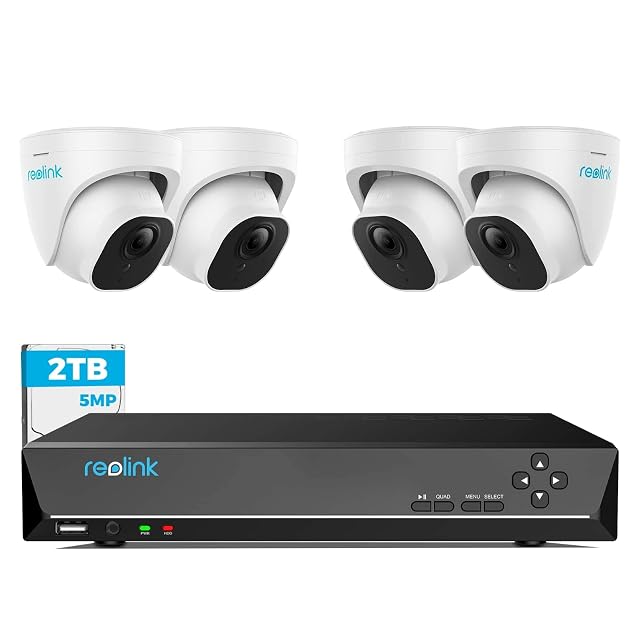
  3. Reolink RLK8-520D4 (5 MP dome set)

    4× 5MP domes · 8CH NVR with 2 TB · 18 m (59 ft) cables supplied · 24/7 recording

    Four 5 MP dome cameras, an eight-channel recorder with a 2 TB drive, and 18-meter network cables in the box. Reolink states person and vehicle detection, continuous recording and compatibility with its 4, 5 and 8 MP cameras.

    Best for: A house wanting a system that will still be supported and expandable in five years.

    7.8/10

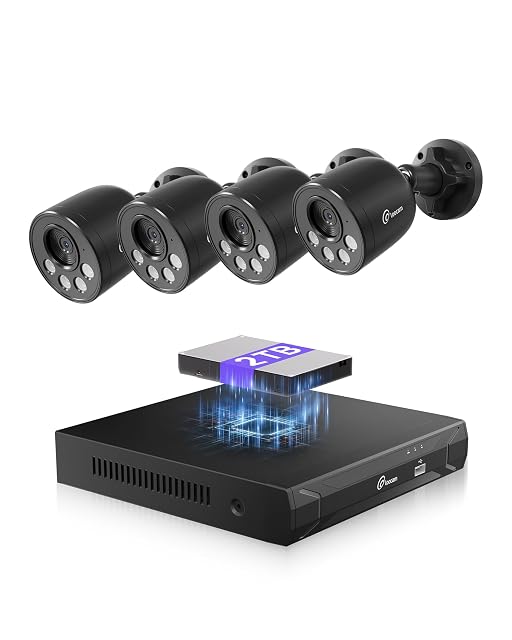
  4. Loocam LC8P8B-8B42E-180

    4K 8MP · 8-channel NVR · 2 TB drive included · H.265+ · 30 m (98 ft) IR

    An eight-channel 4K kit with the recorder and the drive in the box. Loocam states 8 MP cameras, H.265+ compression and a 2 TB drive already fitted, with person detection and push alerts.

    Best for: A first wired system, where everything arriving in one box matters more than the last word in image processing.

    7.2/10

The questions we are asked

What actually goes wrong with wireless cameras?

Not total failure — intermittent failure. Wi-Fi at the far end of a house drops for minutes at a time, and the result is a camera that appears to work with gaps in its recording. That is worse than a camera that visibly stops, because nobody notices.

Is a wired system worth the cabling?

If the cable can be run, almost always. One Ethernet cable carries power and video, the recorder keeps working when the internet is down, and there is nothing to charge. The cabling is done once; after that there is nothing to recharge.

How often do battery cameras need charging?

It depends entirely on how much motion they see, and a busy view drains a battery far faster than a quiet one. Treat published figures as optimistic.

Can wireless cameras record continuously?

Generally not. They record clips around motion to preserve battery. Continuous recording is a wired requirement.

Will Wi-Fi reach my garage?

Test it at the exact spot before mounting anything. Distance and walls defeat more installations than any other factor.

Can I mix the two?

Commonly, and many people do: wired at the important positions and battery cameras filling gaps where cabling is impractical.

Each device, and the door it watches

Tapo C425

Designed for: Someone who wants a battery camera that can be repositioned in seconds and detection that costs nothing extra.
Its main asset: AI person, pet and vehicle detection at no extra cost, stated by TP-Link

Its main gap: A magnetic base is as quick to remove as it is to fit

Read the full review →

Tapo C520WS

Designed for: An outdoor position where Wi-Fi is unreliable and a network cable can be run, or where color at night matters more than an unlit image.

Its main asset: Ethernet as well as Wi-Fi — the only camera in this hub to state it

Its main gap: Color at night still needs some ambient light — it is a sensitive sensor, not night sight

Read the full review →

Reolink RLK8-520D4 (5 MP dome set)

Designed for: A house wanting a system that will still be supported and expandable in five years.

Its main asset: 18 m (59 ft) cables supplied — enough for a normal house without a second order

Its main gap: Dome bubbles need occasional cleaning or the night image hazes

Read the full review →

Loocam LC8P8B-8B42E-180

Designed for: A first wired system, where everything arriving in one box matters more than the last word in image processing.

Its main asset: 2 TB drive supplied and fitted — no separate purchase, no separate decision

Its main gap: 2 TB at 4K is days of continuous recording, not weeks

Read the full review →

What to add to it

Accessories and spares from the same aisle, at the price we read. Confirm they suit the device you choose before ordering: it turns on the model and the part number, which the listing gives.

The short decision

  • If your main worry is our rating → look at Tapo C425

Comparisons that matter here

Device against device, already covered, inside this guide or this aisle.

What this comparison is built on

The devices listed are drawn from the catalog of this site. Specifications are those the maker and the Amazon listing publish; prices are what Keepa recorded on the date shown, and both move. The order follows declared specifications, the balance between stated strengths and stated limits, and price. No device here has been installed or tested by us, and no page claims it was.

Last checked on

Prices quoted in these summaries are dated readings. The live price is shown next to each product.

The tool we use ourselves

Chosen your tool? Now buy it at the right price.

Cameras, alarm kits and safes swing by thirty dollars or more across the year, and the biggest "discounts" often land at prices the same model sold for six weeks earlier. UniverTrack tracks the real price history across retailers, spots fake reductions, and alerts you when it is genuinely the moment to buy.

Real price historyBuy-now alertsAI buying assistant
Try free for 14 days →
No commitment · Cancel in one click · 5 languages